
Simplified English
Test Your CEFR Level: British Council EnglishScore App
Want to improve your English? Start by knowing your current level. The British Council EnglishScore app tests your English skills fast on your phone.
For students joining OutAbout.id English programs, this test helps us place you in the right class.
Understanding Your Score: The CEFR Level Mapping
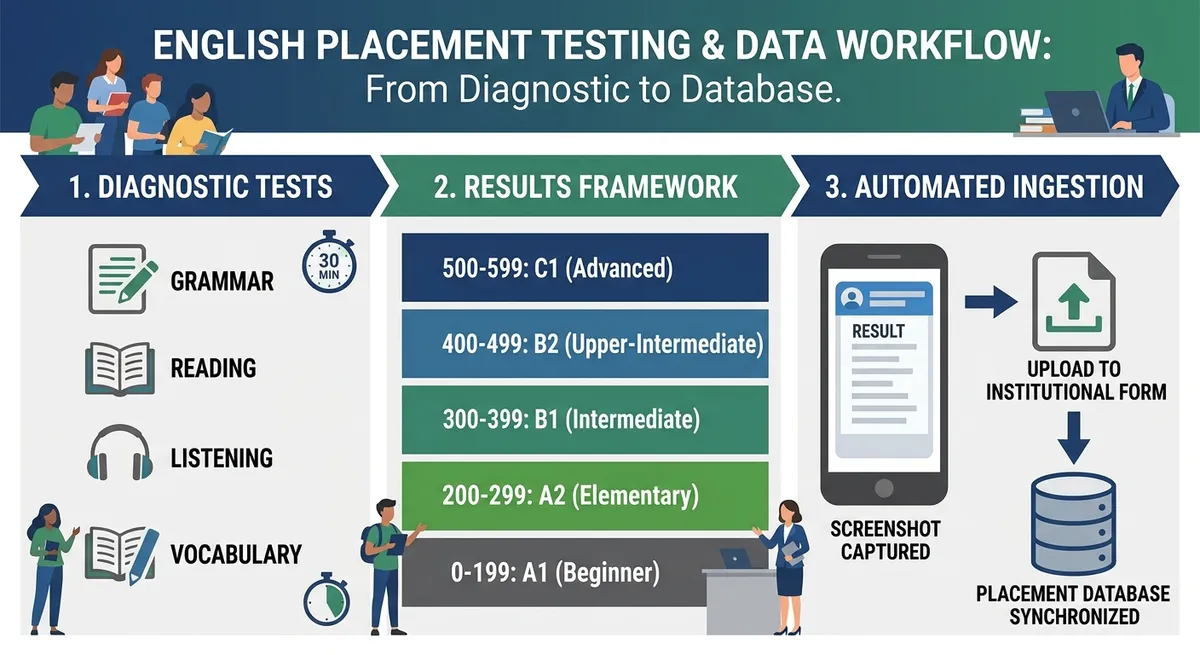
The app checks your Grammar, Vocabulary, Reading, and Listening skills. Your score goes from 0 to 599 and matches these CEFR levels:
| EnglishScore Range | CEFR Level | Level Description | Target Focus |
|---|---|---|---|
| 500 – 599 | C1 | Advanced | High-level business & academic work |
| 400 – 499 | B2 | Upper-Intermediate | Good workplace English |
| 300 – 399 | B1 | Intermediate | Basic professional English |
| 200 – 299 | A2 | Elementary | Simple everyday conversations |
| 0 – 199 | A1 | Beginner | Basic English words and phrases |
How to Take and Capture Your Score on Android
Take a clear photo of your results screen after finishing the test.
Step-by-Step Android Instructions
Install & Complete Test: Download the app from:
Do the test in a quiet room with good lighting. The app uses your phone’s camera to check you’re not cheating.
Find Your Results: Go to your main dashboard. Your score (0–599) and CEFR level will be shown.
Take the Screenshot:
- Press Power Button + Volume Down at the same time.
- Or swipe down with three fingers on newer phones (Samsung, Xiaomi, Oppo, Vivo).
Save the Photo: Your screenshot saves to Pictures/Screenshots on your phone.
Submitting via the OutAbout.id Placement Form
- Upload your screenshot using the upload button.1. Log in to OutAbout.id Placement Form.
English
Test Your CEFR Level: British Council EnglishScore App
Whether you are aiming to advance your career, prepare for higher education, or build everyday conversational confidence, knowing your precise English proficiency baseline is the critical first step.
The British Council EnglishScore app provides a fast, mobile-first assessment aligned with the Common European Framework of Reference for Languages (CEFR).
For students enrolling in the OutAbout.id communicative English programs, submitting this preliminary diagnostic score allows our academic team to place you into the exact learning module best suited for your goals.
Understanding Your Score: The CEFR Level Mapping
The EnglishScore app assesses your Grammar, Vocabulary, Reading, and Listening skills using an adaptive scale from 0 to 599. Your final numerical score maps directly to standardized CEFR levels:
| EnglishScore Range | CEFR Level | Level Description | Target Focus |
|---|---|---|---|
| 500 – 599 | C1 | Advanced | High-level business & academic precision |
| 400 – 499 | B2 | Upper-Intermediate | Fluid workplace interaction & global standards |
| 300 – 399 | B1 | Intermediate | Practical fluency & professional growth |
| 200 – 299 | A2 | Elementary | Everyday conversational confidence |
| 0 – 199 | A1 | Beginner | Essential linguistic foundations |
How to Take and Capture Your Score on Android
To submit your placement data to OutAbout.id . Simply capture a clean screenshot of your results screen upon completing the 30–40 minute core test.
Step-by-Step Android Instructions
Install & Complete Test: Download the app for your mobile platform:
Download for iOS on Apple App Store
Complete the Core Skills test in a well-lit, quiet room (the app uses front-camera face monitoring to ensure test integrity).
Navigate to Results: Once finished, open the main dashboard view displaying your overall numerical score (0–599) and CEFR level badge.
Capture the Screenshot:
- Hardware Method: Press and hold the Power Button + Volume Down Button simultaneously for one second.
- Gesture Method: On modern Android devices (Samsung, Xiaomi, Oppo, Vivo), swipe down vertically across the screen using three fingers.
Locate Image: Your screenshot is automatically saved in PNG or JPEG format in your device’s
Pictures/Screenshotsdirectory.
Submitting via the OutAbout.id Placement Form
Once your screenshot is captured, login to OutAbout.id and submit your diagnostic result:
- Open the OutAbout.id Placement Form.
- Attach the screenshot file using the upload field..
Indonesian
Uji Tingkat CEFR: Aplikasi EnglishScore British Council
Apakah Anda ingin memajukan karir, mempersiapkan pendidikan tinggi, atau membangun kepercayaan diri dalam percakapan sehari-hari? Mengetahui tingkat kemampuan bahasa Inggris yang tepat sebagai langkah awal kritis.
Aplikasi British Council EnglishScore menyediakan penilaian cepat, berbasis mobile yang selaras dengan Common European Framework of Reference for Languages (CEFR).
Untuk siswa yang mendaftar di program bahasa Inggris komunikatif OutAbout.id, pengiriman skor diagnostik awal ini memungkinkan tim akademik kami menempatkan Anda ke modul pembelajaran yang paling sesuai dengan tujuan Anda.
Memahami Skor Anda: Pemetaan Tingkat CEFR
Aplikasi EnglishScore mengevaluasi Tata Bahasa, Kosakata, Membaca, dan Mendengar menggunakan skala adaptif dari 0 hingga 599. Skor numerik akhir Anda secara langsung terhubung dengan tingkat CEFR yang standar:
| Rentang EnglishScore | Tingkat CEFR | Deskripsi Tingkat | Fokus Target |
|---|---|---|---|
| 500 – 599 | C1 | Lanjutan | Ketepatan tinggi dalam bisnis & akademik |
| 400 – 499 | B2 | Menengah-Atas | Interaksi kerja yang lancar & standar global |
| 300 – 399 | B1 | Menengah | Kemampuan praktis & pertumbuhan profesional |
| 200 – 299 | A2 | Dasar | Kepercayaan percakapan sehari-hari |
| 0 – 199 | A1 | Pemula | Fondasi linguistik dasar |
Cara Mengambil dan Mencatat Skor di Android
Untuk mengirimkan data penempatan Anda ke OutAbout.id, cukup ambil tangkapan layar yang bersih dari layar hasil setelah menyelesaikan tes inti 30–40 menit.
Langkah-demi-Langkah Instruksi Android
Pasang & Selesaikan Tes: Unduh aplikasi untuk platform mobile Anda:
Unduh untuk iOS di Apple App Store
Selesaikan Tes Kemampuan Inti di ruangan terang dan tenang (aplikasi menggunakan pemantauan kamera depan untuk memastikan integritas tes).
Navigasi ke Hasil: Setelah selesai, buka tampilan dashboard utama yang menampilkan skor numerik keseluruhan (0–599) dan badge tingkat CEFR.
Ambil Tangkapan Layar:
- Metode Perangkat Keras: Tekan dan tahan Tombol Daya + Tombol Volume Turun secara bersamaan selama satu detik.
- Metode Gestur: Pada perangkat Android modern (Samsung, Xiaomi, Oppo, Vivo), geser vertikal ke bawah di layar menggunakan tiga jari.
Lokasi Gambar: Tangkapan layar Anda disimpan secara otomatis dalam format PNG atau JPEG di direktori
Pictures/Screenshotsperangkat Anda.
Pengiriman melalui Formulir Penempatan OutAbout.id
Setelah tangkapan layar diambil, login ke OutAbout.id dan kirimkan hasil diagnostik Anda:
- Pasang file tangkapan layar menggunakan bidang unggah.1. Buka Formulir Penempatan OutAbout.id.


